
IBM SPSS Statistics 30
macOS Sequoia 15.0に正式対応
- Windows 11対応
- macOS Sequoia 対応
- 初年度12か月保守付き
- ダウンロード/DVD
SPSS v30の新機能
特に医療統計でよく使用される Bland-Altman analysis (ブランド-アルトマン分析)の機能が追加され、Univariate(単変量)とMultivariate(多変量)の正規性の評価に対応しました。また、macOS Sequoia 15.0 に正式対応しています。v30で追加された新機能は以下の通りです。
Bland-Altman analysis
2つの異なる測定方法間の測定値の差を視覚化
分析 > 記述統計 > ブランド・アルトマン分析
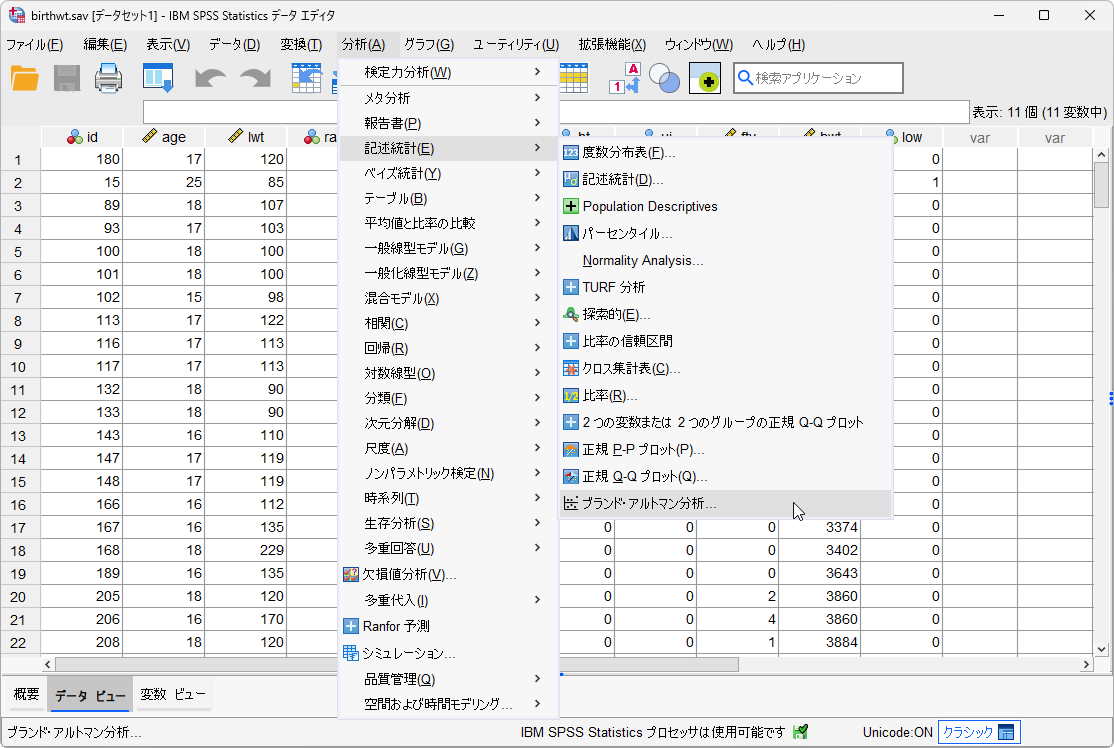
ブランド-アルトマン分析は、2つの異なる測定方法間の測定値の差を視覚化するために使用されます。結果として得られるグラフは散布図で、Y軸には2つのペア測定値の差(A-B)が表示され、X軸にはこれらの測定値の平均値((A+B)/2)が表示されます。つまり、2つのペア測定値の差をそれらの平均に対してプロットします。
Bland Altman Analysis is used to visualize the difference in measurements between two different measurement techniques.The resulting graph is a scatter plot XY, in which the Y axis shows the difference between the two paired measurements (A-B) and the X axis represents the average of these measures ((A+B)/2). In other words, the difference of the two paired measurements is plotted against the mean of the two measurements.
正規性分析
正規性の評価
分析 > 記述統計 > 正規性分析
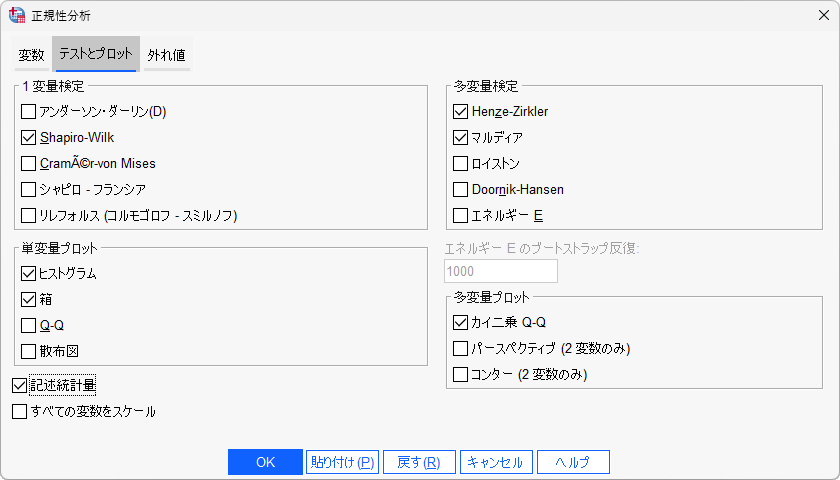
v30では、データの分布が正規分布に従っているかどうかを評価する Normality Analysis が強化され、多変量正規性検定(Mardia / Royston / Henze Zirkler / Doornik Hansen / Energy)、多変量プロット(Chi Square Q-Q plot / Perspective Plot / Contour Plot)、単変量正規性検定(Anderson Darling / Shapiro Wilk / Shapiro Francia / Lilliefors (Kolmogorov Smirnov) / Cramér von Mises)、単変量プロット(Histogram / Box Plot / Q-Q plot / Scatter Plot)などの機能が追加されました。
In v30, Normality Analytics has been enhanced to assess whether the data follows a normal distribution. It now includes Multivariate Normality Tests (Mardia / Royston / Henze-Zirkler / Doornik-Hansen / Energy), Multivariate Plots (Chi-Square Q-Q Plot / Perspective Plot / Contour Plot), Univariate Normality Tests (Anderson-Darling / Shapiro-Wilk / Shapiro-Francia / Lilliefors (Kolmogorov-Smirnov) / Cramér-von Mises), and Univariate Plots (Histogram / Box Plot / Q-Q Plot / Scatter Plot).
ダークモードへの表示切替
新しいデザイン機能の導入
編集 > オプション > 全般タブ > ルック & フィール
SPSS Statistics v30では、新しいデザイン機能としてアプリの背景をより暗い色に切り替えるダークモードが導入されました。これにより、デバイス画面から発せられる光を抑えます。特に、暗い環境ではダークモードの方が目に優しく、画面のまぶしさを軽減し、長時間の使用でも快適さを保ちます。
SPSS Statistics v30 introduces a design feature that switches the app's background to a darker color which reduces light emitted by device screens.Especially in low light conditions, Dark Mode is easier on the eyes, minimizing glare and making it more comfortable for prolonged use.It also provides a stylish, contemporary look that appeals to design conscious users.
その他の拡張
起動パフォーマンスの改善と4Kモニター対応
機能強化
SPSS Statistics v30では、アプリケーションの起動パフォーマンスが改善されました。JRE(Java Runtime Environment)のバージョンをアップグレードし、ヒープメモリを増やすことで、アプリケーションの起動時間が短縮されています。また、高解像度の4Kモニターに対応しました。言語翻訳に関しては、Mac、Windows、Linux環境において分析メニューと分析結果に見られた韓国語の翻訳問題が修正されました。さらに、R言語のランタイムもアップグレードされ、Rのバージョンが4.2.2から4.4.0へと移行されています。
In SPSS Statistics v30, the application's startup performance has been improved. By upgrading the Java Runtime Environment (JRE) version and increasing the heap memory, the startup time has been significantly reduced. Additionally, language translation issues have been addressed, particularly the Korean translation errors found in the Analysis Menu and Analysis Results on Mac, Windows, and Linux platforms. Furthermore, the R language runtime has been upgraded from version 4.2.2 to 4.4.0.
価格について
このバージョンアップによるSPSSライセンス価格に変更はございません。2024年10月1日以降の新規購入は「30」での納品となる予定です。 詳細は、WEBお見積りフォームよりお気軽にお問合せください。
macOSの動作環境について
Sequoia 15.0が正式動作環境に追加されました。詳細は、IBM Software Product Compatibility Reportsでご確認ください。
バージョンアップについて
IBM SPSS Statistics をご購入済みで、PA(パスポート・アドバンテージ)による保守サービスが有効なお客様は、 追加の費用をご負担いただくことなく無料でv30にアップグレードできます。ダウンロード方法が分かりにくい、 ダウンロードに時間がかかるなどお困りのお客様は弊社担当営業にご相談ください。なお、バージョンアップ等の サポート対応は、弊社よりSPSSをご購入のお客様に限らせていただいております。保守なしの場合はお手数でも 購入元の販売代理店様にお問合せくださいますようお願い致します。
IBM、IBM logo、ibm.com は、International Business Machines Corporation の米国およびその他の国における商標です。
SPSS導入のご相談はお気軽に
製品やサービスに関するご相談はお気軽にお問合せください。
電話でのお問合せ
047-711-0427受付時間: 平日 9:00-17:00
WEBフォーム
見積を依頼する原則として1営業日以内にご返信します
emailで問合せ
info@stats-guild.com
原則として1営業日以内にご返信します